Define Your Sales Pipeline Stages (with Clear Entry/Exit Criteria)
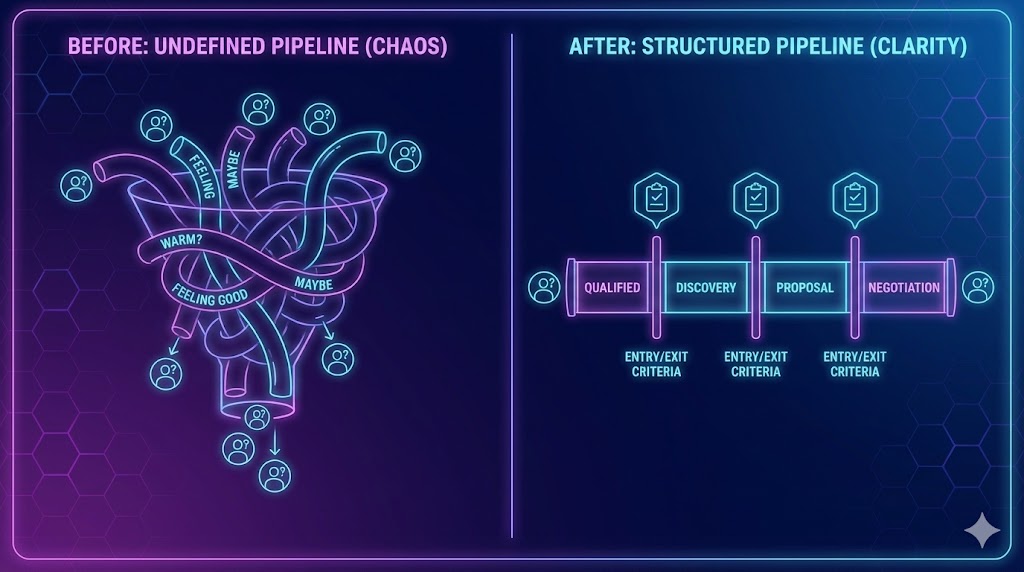
Define pipeline stages with simple “entry” and “exit” rules so deals don’t get stuck and your forecast isn’t fiction.
📌 Summary
Outcome: A pipeline you can trust (clean handoffs, real forecasts, faster cycles).
Time: 60–90 minutes setup, then 15 minutes/week.
Owner: Sales lead (or Founder) + anyone who sells.
Steps: Choose stages → define entry/exit → set required fields → align next steps → run weekly hygiene.
Metrics: Stage conversion rates, average sales cycle, forecast stability.
🎯 What you’ll achieve (in 2 weeks)
Everyone uses the same language for “where a deal is.”
Fewer stalled deals and less “wishful thinking” forecasting.
Clear next actions to move deals forward (or disqualify fast).
⏱️ Time & effort
Setup: 60–90 minutes
Ongoing: 15 minutes/week
Owner: Sales lead (or Founder)
Dependencies: A place to track deals (CRM, Super, spreadsheet, Kanban—anything)
🚦When to use this (signals)
Use this quick win if:
Your pipeline is a list of names with no shared meaning.
Deals stall and nobody knows what’s missing.
Forecast conversations are mostly opinions.
Two people describe the same deal stage differently.
🧩 Steps (follow in order)
1) Pick 5–7 stages (keep it simple)
A universal B2B-ish pipeline (works for many companies):
New / Untriaged
Qualified
Discovery
Solution / Proposal
Negotiation / Commit
Won
Lost
If you’re more transactional, compress to 4–5 stages. The goal is clarity, not complexity.
2) Define the Entry criteria for each stage (one sentence)
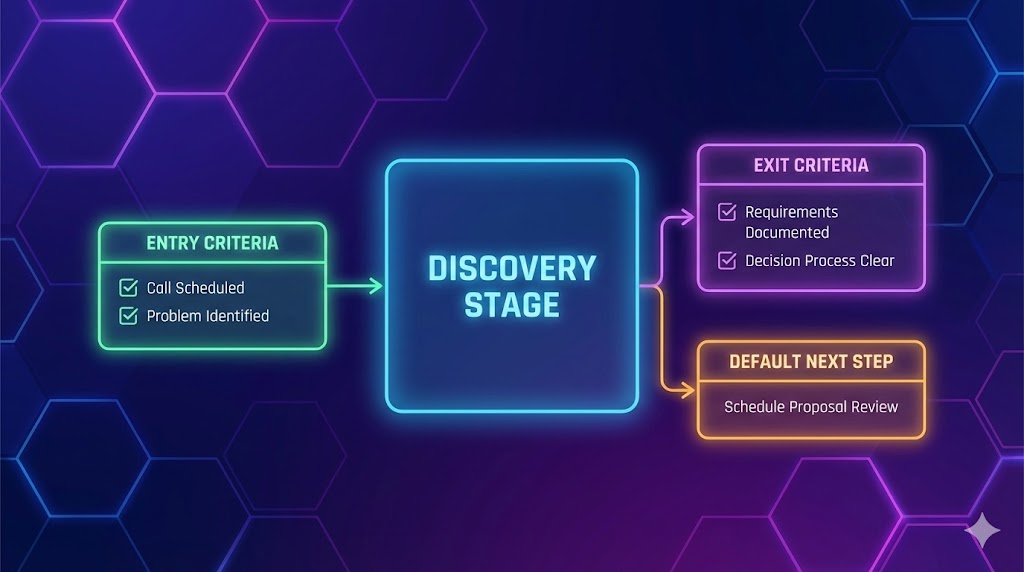
Entry criteria = the “proof” required to put a deal in a stage.
Examples:
Qualified (Entry): “We confirmed problem + buyer role.”
Discovery (Entry): “Discovery call scheduled or completed.”
Rule: entry criteria must be observable (not vibes).
3) Define the Exit criteria + the default next step (one sentence each)
Exit criteria = the “proof” required to move a deal to the next stage.
Examples:
Discovery (Exit): “We documented requirements + success criteria + decision steps.”
Default next step: “Send recap + schedule solution review.”
Every stage gets:
Exit criteria (what must be true to move forward)
Default next step (what you do immediately)
4) Add 4 required fields (minimum viable data)
Require these fields on every deal:
Deal value (or expected monthly value)
Close date (best current estimate)
Stage (based on criteria above)
Next step (what you will do next)
Optional but useful:
Source
Primary stakeholder
5) Add two easy “keep it fresh” rules (reduce stalls)
Choose rules that are simple and realistic:
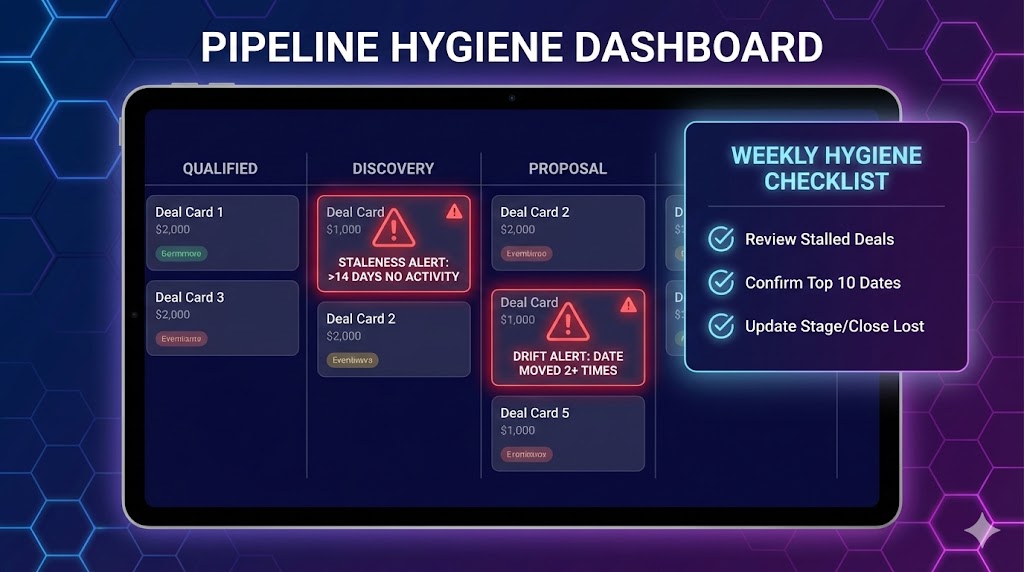
Rule 1 (staleness): If there’s been no meaningful activity in 14 days, the deal must be reviewed in the weekly pipeline check.
Rule 2 (close date drift): If the close date has moved 2+ times, the deal must be re-qualified (or moved backward).
These rules don’t “kick deals out”; they just force a decision instead of denial.
6) Align on definitions with the team (15 minutes)
Read each stage definition out loud, then test with 2–3 real deals:
“Based on entry criteria, what stage is this deal really in?”
Fix ambiguity immediately.
7) Run weekly pipeline hygiene (15 minutes)
Every week:
Review deals flagged by your two rules
Confirm top 10 deals have a realistic close date + value
Update stage only if criteria are met
Move / re-qualify / close lost quickly
✅ Done Definition (DoD)
You’re “done” when:
Pipeline has 5–7 stages with names everyone understands
Every stage has entry + exit criteria (one sentence each)
Every deal has the required fields (value, close date, stage, next step)
Two “keep it fresh” rules exist and are enforced
Weekly pipeline hygiene is scheduled (15 minutes)
📥 Templates (copy/paste)
Template 1 — Stage definitions (fill-in)
Stage: [Name]
Entry criteria (proof to be in this stage): [observable condition]
Exit criteria (proof to move forward): [observable condition]
Default next step: [action]
Template 2 — Minimum viable pipeline fields (for a sheet/CRM)
Columns:
Deal name
Company
Owner
Stage
Value
Close date
Next step
Last activity date
Notes
Template 3 — “Keep it fresh” rules (pick 2)
Staleness rule: If no meaningful activity in 14 days, review in weekly pipeline check.
Close date drift rule: If close date moves 2+ times, re-qualify or move backward.
⚠️ Common mistakes (avoid these)
Mistake: Too many stages (10+) → Do this instead: 5–7 max.
Mistake: Stages are feelings (“warm”, “hot”) → Do this instead: criteria based on actions/events.
Mistake: Deals stay in late stages without evidence → Do this instead: don’t move stages unless exit criteria is met.
Mistake: Weekly review turns into storytelling → Do this instead: review only deals that violate the rules.
📈 How to know it’s working (in 2 weeks)
Process metric: ≥90% of deals have a clear “next step”
Quality metric: ≤15% of deals are stale (no activity in 14 days)
Outcome proxy: Forecast conversations take less time and feel less subjective
❓FAQ
What if we’re B2C or transactional?
Use fewer stages (New → Contacted → Negotiating → Won/Lost) and still define entry/exit criteria.
Do we need probabilities per stage?
Not at first. Get the pipeline clean; probabilities come later from conversion data.
What if we have different sales motions?
Start with one pipeline. Only split pipelines once you can run weekly hygiene reliably.
🔗 Related quick wins
Want this to run automatically?
You can implement this with any tools. If you’re using Super, you can standardize pipeline stages, enforce required fields, and automate follow-up tasks in one place.